
Appearance
FAQ
Can I delete a user from a project if he logged an expense in that project?
Yes, the expense will be unaffected.
How do I clear Consult cookies?
This answer is written with Microsoft Edge as reference, but similar steps will apply for all major browser platforms.
Completing these steps will cause you to be signed out and require you to log in again.
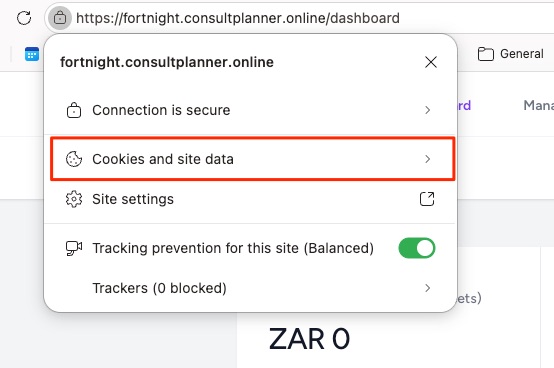
While on the Consult URL, select the lock symbol and click Cookies and site data:
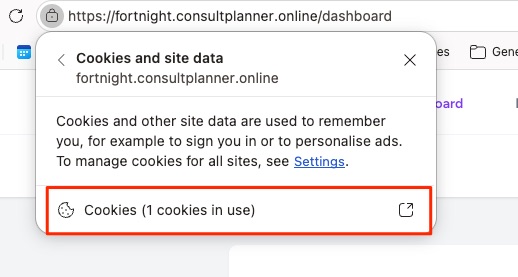
Next, select the Cookies option:
Lastly, select the specific cookie and click Remove:
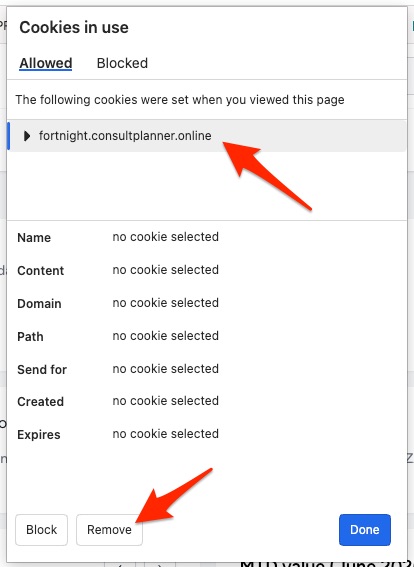
Upon reloading the Consult website, you should be taken to the login page again.
What are the data sources for Consult?
- App input. For example, users entering data on the timesheets page.
- Excel spreadsheets (import). Certain sections of Consult enables the import of data from an Excel spreadsheet.
What happens if I change mileage rate during a project?
Only expenses created after the mileage rate update will use that mileage rate. Previous expenses will not be affected by the rate change.
What is the difference between between "Reports to" and "Resource Manager"?
"Reports To", configured at User > Overview, is the line manager of the user. This person will show up one level higher on the organogram, with the user being linked as a direct report. Typically, this would be the manager to whom the user reports.
The "Resource Manager" is the person responsible to approve requests for allocating the user to a project. This would typically be the same as the "Reports To" person, but can also be someone that is responsible for the resource utilization of a particular division in a company.
Why can’t I edit my expense report?
It's most likely because it's not in draft. Expenses in approved or paid status can't be edited.
Why can't I capture hours on my timesheet (cells greyed out)?
You are part of a pending resource allocation request for that project and week. This will be evidenced by an orange clock next to the project name in the timesheet.
Resolution: Ask your resource manager to approve or reject the resource allocation request.
An invoice for that period has been created with "Lock Hours" selected. This typically happens when a project has a regular invoicing schedule and you are trying to add hours after the invoicing period.
Resolution: Ask your project manager (PM) what he would prefer. If your PM wants you to still capture the hours during that invoice period, then he would have to deselect the "Lock Hours" option for that invoice until you have captured your hours. After that, he would lock it again.
The project end date has been reached.
Resolution: If your project manager wants you to capture hours for that period, he would have to update the project's end date.
You have reached your allotted hours on the project and your PM has locked your role to prevent exceeding the planned hours.
Resolution: Ask your PM to allocate more hours for you. Alternatively, your PM can also turn off hour management if he would allow you to exceed your total planned hours on the project.
Your timesheet has been submitted or approved.
Resolution: If your timesheet has been submitted, then ask your RM to decline the approval request if you still want to added hours. If your timesheet has been approved, ask your PM if you can add the hours on a subsequent week or reach out to Consult support for assistance.
You don't have any deliverables assigned to you (for WBS projects).
Resolution: Ask your PM to assign deliverables to you.
Why do I get There was an error on row 2. The name field is required. when I upload my public holidays.
This is likely due to Excel automatically formatting the CSV in such a way that it doesn't remain a pure CSV any more.
Why do I see a different group of people on my list of resources and my resource organogram?
Your resource organogram is created using only the resources for which you are the primary resource manager, whereas your list of resources includes those for which you are not the primary resource manager.
Why is Consult running slowly?
Consult may feel slow because of stored cache data in your browser affecting its performance. Clearing your browser cache usually resolves this issue.
When does Consult automatically decline a leave request?
A leave request is automatically declined if both of the following are true:
- The leave was created more than 10 days ago.
- The start date is more than 3 days in the past.
Sick leave and family responsibility leave are excluded from automatic declines.
What is the difference between the actual and available leave balance?
The actual leave balance reflects the financial position on payroll, and does not subtract pending requests. The available leave balance is what an employee can still apply for, with pending requests subtracted. For full definitions, see the glossary.
Why does my project rate change not affect older invoices?
Project rates are time-effective, meaning a change only affects new hours captured from the change date onward. Historical invoices and timesheet entries keep the rate that was active at the time the hours were logged. The same principle applies to mileage rates.
WARNING
The internal rate on a user profile behaves differently and does retroactively recalculate historical margin and cost. See Understanding rate changes.