
Expense logging
How expenses are logged and the workflow each expense report follows.
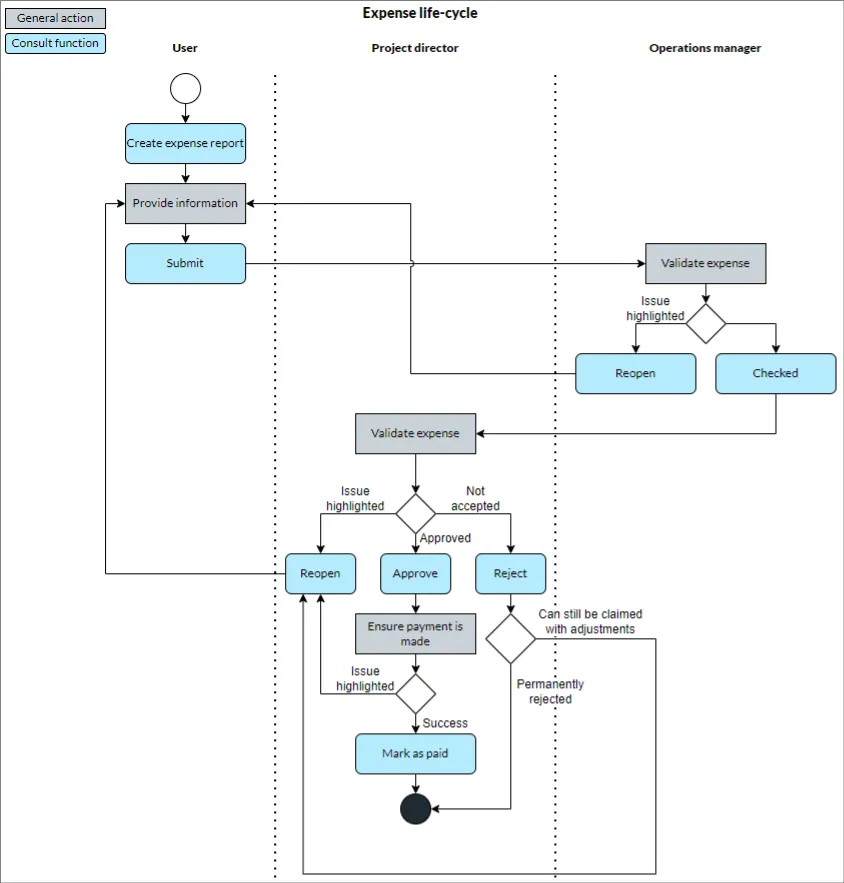
The following diagram shows the process flow an expense report follows:
Who can advance an expense
The user who can take an expense to the next stage depends on whether the expense belongs to a project:
| Stage | Project expense | Non-project expense |
|---|---|---|
| Check | Someone with “Manage users” ability | Someone with “Manage users” ability |
| Approve | Project director | Line manager |
| Mark as paid | Project director | Line manager |
Where reports are reviewed
Reviewers work through reports from the Expense Reports tab of the Inbox, which is split into one sub-tab per stage: Unchecked, Pending Approval, and Unpaid. See approve expense reports for how to action a report from each stage.
Submitting a report notifies the person who has to review it. See expense report submitted for who that is.