
Invoice calculation
How invoice amounts and totals are calculated from billed hours, rates, expenses, and credit notes.
This page explains how invoice amounts are calculated from billed hours and rates.
Invoice data sources
When an invoice is created, it automatically pulls data from two sources:
- Timesheets: the time invested in the project by employees.
- Expenses: the project-linked expenses logged by employees.
Billing cycle example
Consider an invoice created for the billing cycle 12 August to 16 September:
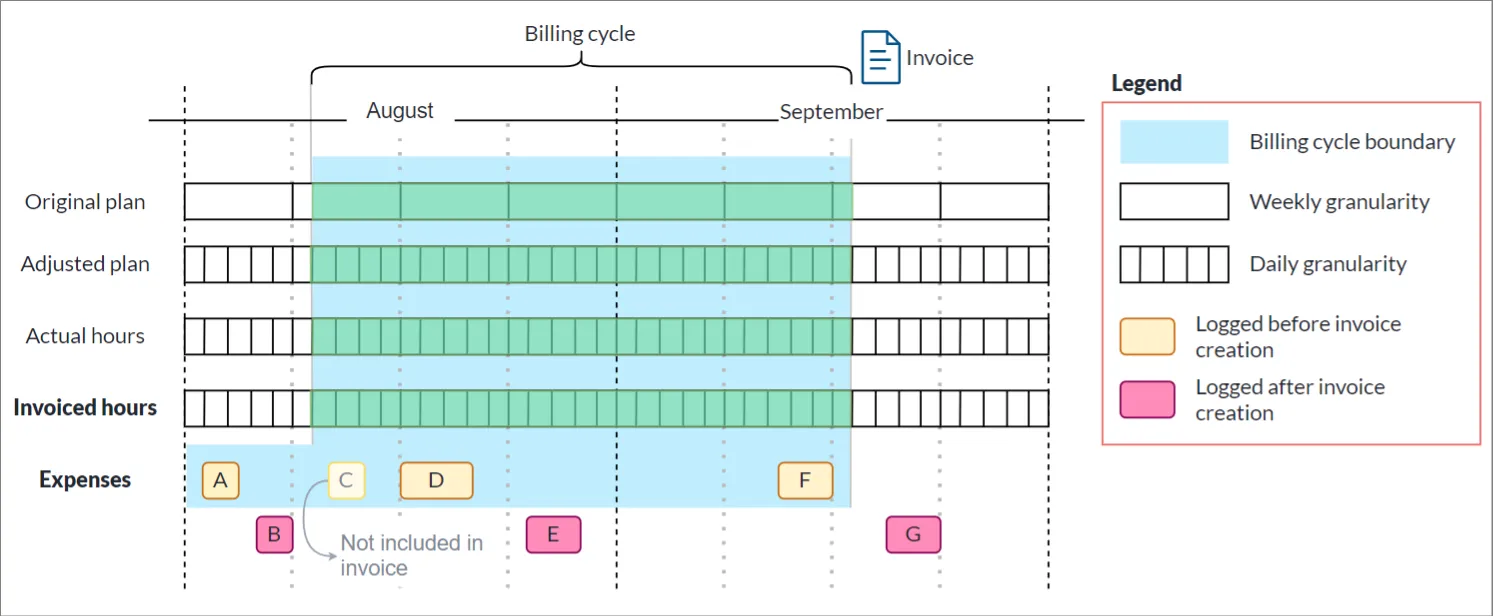
Although the baseline, forecast, and actual hours are within the billing cycle boundary, the value of the invoice is determined by the invoiced hours and expenses.
Expenses logged before the invoice was created are handled as follows:
- A: This expense belonged to the previous billing cycle, but since it had not yet been included in an invoice, it is pulled into this billing cycle’s invoice.
- C: Although this expense falls within the billing cycle, it is not ready to be included because it has not yet been approved by the project director or has been excluded for another reason.
- D and F: These expenses were logged and approved during the billing cycle and therefore form part of the invoice.
Expenses logged after the invoice was created are handled as follows:
- B, E, and G: These expenses will form part of a subsequent invoice.
Removing an expense report from an invoice, which is possible until the invoice is marked as sent, recalculates the total straight away and makes the report available to a later invoice.
Totals on the invoice page
The invoice page shows the total both excluding and including tax, using the tax percentage and acronym of the project’s currency. The invoiced hours are priced at the rate frozen for each week, and line items are any amounts added to the invoice by hand:
- Excluding tax:
- Including tax:
Both are worked out in Consult rather than taken from an accounting system. The amount shown on the invoices list is the total excluding tax and is not reduced by credit notes.
Totals on an invoice exported to Xero
An invoice exported to Xero shows a Xero Invoice card instead, with its figures taken from Xero rather than worked out in Consult:
- Invoiced: The invoice total including tax, as held in Xero.
- Payments Received: The payments made against the invoice.
- Credit Notes: The credit notes allocated to the invoice, taken off the total including tax. Credit notes voided or deleted in Xero are left out.
- Outstanding: The amount Xero itself reports as still due once payments and credits are taken off.
The settlement bar on the card is the invoiced amount less the outstanding amount, as a share of the invoiced amount. Because these figures come from Xero, they can differ from Consult’s own, for example by rounding.
Where Consult does not yet hold the invoice’s total from Xero, a smaller card shows Payments received and Outstanding in Xero instead.
Variance against hours captured
The card’s Variance vs Hours Captured is worked out as follows:
It is shown as a percentage of the hours value too. Expense reports and line items are in the Xero subtotal but not in the hours value, so they count towards the variance. So does any difference between the amounts on custom line items and the value of the hours they cover.