
Appearance
Notification catalogue
Consult sends notifications across three channels: email, in-app inbox, and Telegram*. This page lists the notifications that exist and the events that trigger them.
*The Telegram channel is off by default and can be enabled for a client on request.
Channels
- Email: Sent via the Consult email address.
- In-app inbox: Stored in the user's notifications inbox in Consult.
- Telegram: Sent through the linked Telegram bot. Only delivered if the user has linked their Telegram account and the tenant has enabled.
Each user can configure their notification preferences per notification type, per channel, from their profile.
User-configurable notifications
Users manage their preferences from Profile > Notification Preferences:
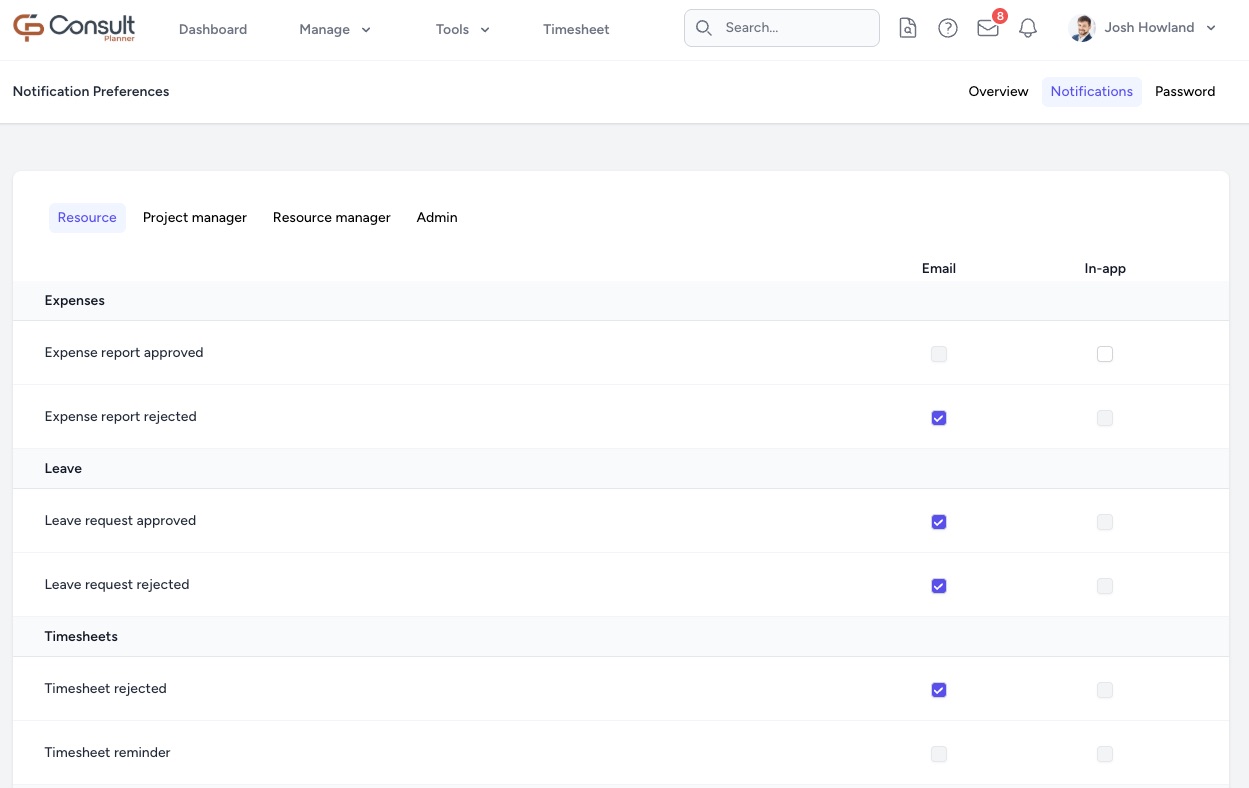
The page groups notifications into role-specific tabs, and each tab is split into categories. Only the channels listed against a notification can be turned on or off. Other channels never deliver that notification.
Defaults:
- For new users, every preference defaults on for every supported channel.
- A user can disable any individual channel for any notification listed below.
- The Resource tab is visible to every user. The Project manager, Resource manager, and Admin tabs are only visible to users with the matching role or permission.
Resource tab
Expenses
| Notification | Trigger | Default channels |
|---|---|---|
| Expense report approved | An expense report the user submitted has been approved. | In-app inbox |
| Expense report rejected | An expense report the user submitted has been rejected. |
Leave
| Notification | Trigger | Default channels |
|---|---|---|
| Leave request approved | A leave request the user submitted has been approved. | |
| Leave request rejected | A leave request the user submitted has been rejected. |
Timesheets
| Notification | Trigger | Default channels |
|---|---|---|
| Timesheet rejected | A timesheet the user submitted has been rejected by their manager. | |
| Timesheet reminder | Weekly Friday reminder at 13:30 to complete the current week's timesheet. |
Projects
| Notification | Trigger | Default channels |
|---|---|---|
| Project manager assigned | The user has been assigned as project manager on a project. | In-app inbox |
Project manager tab
Project lifecycle
| Notification | Trigger | Default channels |
|---|---|---|
| Project approaching end date | Daily 07:00 reminder for projects approaching their end date that need to be completed or extended. | |
| Project passed end date | Daily 07:00 reminder for projects whose end date has passed without being completed or extended. | |
| Project status changed | A project the user is on has changed status. | In-app inbox |
| Project timesheet summary | Weekly Monday 07:00 summary of timesheet activity per project the user manages. | |
| Project duration changed | A project the user is on has had its start or end date changed. | In-app inbox |
Scheduling
| Notification | Trigger | Default channels |
|---|---|---|
| Rollover failed | Weekly schedule rollover failed for a project the user manages. | |
| Schedule update rejected | A proposed schedule update was rejected. | In-app inbox |
| Schedule updated | A resource schedule on a project the user manages was updated. |
Resources on projects
| Notification | Trigger | Default channels |
|---|---|---|
| Resource allocation request | A resource allocation request has been submitted that the user can approve. | Email, In-app inbox |
| Resource deallocated | A resource has been removed from a project the user manages. | Email, In-app inbox |
| Resource over utilized | Daily 07:00 alert for a resource scheduled above their maximum hours. | In-app inbox |
Utilization
| Notification | Trigger | Default channels |
|---|---|---|
| Utilization summary report | Weekly Friday 13:30 rollup of resource utilisation across managed projects. |
Resource manager tab
Expense reviews
| Notification | Trigger | Default channels |
|---|---|---|
| Expense report submitted | An expense report has been submitted that the user must review. |
Leave management
| Notification | Trigger | Default channels |
|---|---|---|
| Leave request created | A direct report has submitted a leave request awaiting approval. | |
| Leave request cancelled | A leave request the user approved has been cancelled. |
Resource allocations
| Notification | Trigger | Default channels |
|---|---|---|
| Resource allocated | A resource the user manages has been allocated to a project. | In-app inbox |
| Resource allocation request | A resource allocation request has been submitted that the user can approve. | Email, In-app inbox |
Workforce management
| Notification | Trigger | Default channels |
|---|---|---|
| Timesheet submitted | A direct report has submitted a timesheet for approval. |
Admin tab
The Admin tab exists so users with the Manage Users permission can toggle their personal copy of notifications they are likely to receive through tenant-wide notifiable lists or the manager role. The triggers below are the same as in the other tabs; only the routing into the admin's inbox is different.
Expense governance
| Notification | Trigger | Default channels |
|---|---|---|
| Expense report approved | An expense report has been approved; routes to the tenant's expense or training expense recipient list. | In-app inbox |
Leave governance
| Notification | Trigger | Default channels |
|---|---|---|
| Leave request approved | A leave request has been approved; routes to the tenant's leave recipient list. |
Project lifecycle governance
| Notification | Trigger | Default channels |
|---|---|---|
| Project status changed | A project the recipient is a member of has changed status. | In-app inbox, |
| Project sold | A project has transitioned to Sold; routes to every user with the manager role. |
User, project, and client setup
| Notification | Trigger | Default channels |
|---|---|---|
| Client created | A client has been created by another user; routes to every user with the manager role. | In-app inbox |
| User created | A user account has been created by another user; routes to every user with the manager role. | In-app inbox |
| Project created | A project has been created by another user; routes to every user with the manager role. | In-app inbox |
Always-on notifications
These notifications do not appear in the preference UI and cannot be toggled by the user. They are sent whenever their trigger fires.
| Notification | Trigger | Channels |
|---|---|---|
| Welcome | A user account has been created with an author, prompting the user to set a password. | |
| Password changed | The user's password has been changed. | |
| Happy birthday | Daily 08:00, sent to every user whose birthday falls on the current day. | |
| Contractor unavailability created | A contractor logged time as unavailable; sent to the contractor's managers. | |
| Pre-leave timesheet reminder | Weekdays 13:30, reminds users to submit pending timesheets before scheduled leave starts. | |
| Schedule export ready | A schedule export the user requested has completed. | |
| Schedule import completed | A schedule import the user uploaded has completed. | |
| Schedule import failed | A schedule import the user uploaded has failed. | |
| Timesheet export ready | A timesheet export the user requested has completed. | |
| Invoice expenses export ready | An invoice expenses export the user requested has completed. | |
| Expense report created | An expense report has been created and is sitting in draft. | |
| Expense report checked | An expense report has been marked as checked, ready for the next approval step. | |
| Weekly timesheet report | Weekly Monday 08:00, summarises timesheet status for managers and admins. |
Custom recipients
Administrators can add extra recipients for certain approval notifications under Approval Notifications in admin settings:
- Approved expenses, excluding training.
- Approved training.
- Approved leave.
This is useful for routing approvals to a finance or HR distribution list. The lists are tenant-wide and are merged into the recipients of the corresponding Expense report approved or Leave request approved notification.
Routing and escalation
Consult uses the following general logic to determine routing and escalations:
- Direct managers: Most user-facing notifications are routed to the recipient's active managers, primary manager first.
- Project notifiable managers: Resource allocation and leave notifications also route to project managers whose Email Notifications flag is on for the project.
- Tenant-wide recipient lists: Approved expenses, approved training expenses, and approved leave route to the lists configured by an admin under Approval Notifications.
Two escalation paths operate without sending a fresh notification:
- Resource allocation requests: A request that has been pending for seven calendar days has the manager of the resource's manager added as an additional approver. The request appears silently in the new approver's inbox, so no email is sent on escalation.
- Leave requests: At creation time, if every direct manager is themselves on approved leave, the request routes to those managers' own managers instead.
The schedule for jobs that drive periodic notifications is documented on the Scheduled jobs page.