
Appearance
Approve resource requests
This guide explains how resource managers review and action resource allocation requests in Consult. These requests are created when a project manager allocates a user to a project and the allocation cannot be approved automatically. For the project manager side of this workflow, see Assign work to resources.
Only users who are resource managers for other users can receive these requests in My Inbox.
Review a resource request
To review a request:
- Click the inbox icon in the top navigation bar.
- Open the Resource Allocations tab.
- Find the request and click Review.

The review modal shows the requested project together with the employee's overlapping projects for the same period.
- Review the planned hours across the affected projects.
- Click a month heading to expand the weekly breakdown.
- Update the planned hours directly in the cells if capacity needs to be moved between projects.
- Click Fill hours if the hours need to be distributed more quickly across the visible period.
- Click Approve to accept the request, or click Reject to decline it.
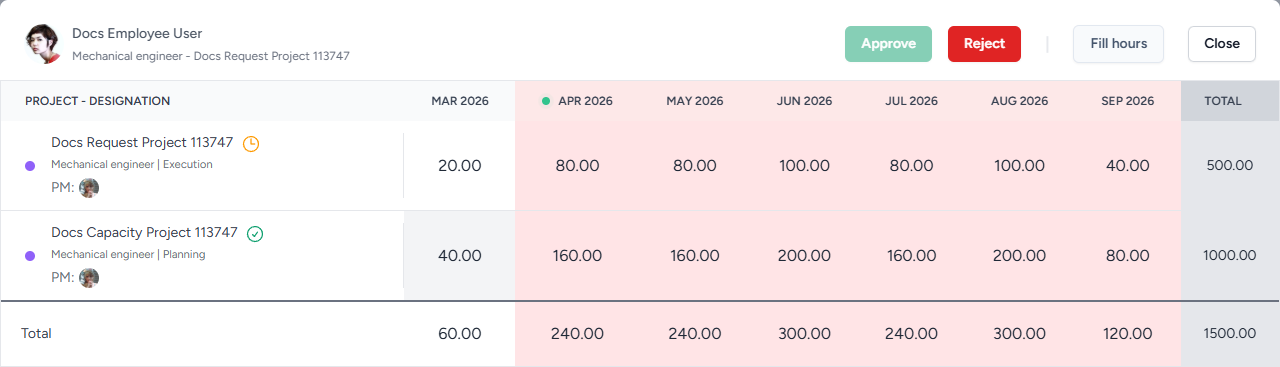
You can change hours for any project shown in the modal before approving the request. This makes it possible to reduce hours on one project and free capacity on another.
WARNING
The modal can include projects where the resource manager is not the project manager. Discuss any hour changes with the relevant project manager before saving or approving the request.
If a new allocation request is rejected, the user is removed from the requested project resource. If the request is for changes to an already approved allocation, the pending hours are reverted to the last approved values.
Automatic approvals
Consult does not always send resource allocations to the resource manager for manual review. An allocation is approved automatically in the following situations:
- When the user has enough capacity for the planned hours and the person making the allocation is also that user's resource manager.
- When the user has enough capacity and no resource manager has been assigned to that user.
- When the user is allocated before any hours have been planned for that role on the project.
- When hours are edited on an existing allocation and the updated hours still meet one of the automatic approval conditions above.
When an allocation is approved automatically, it does not create an item under My Inbox > Resource Allocations. If the requested hours create a capacity conflict and the allocation does not qualify for automatic approval, the request is sent to the resource manager for review.