
Approve leave requests
Approve or decline employee leave requests from the Inbox and track what happens after.
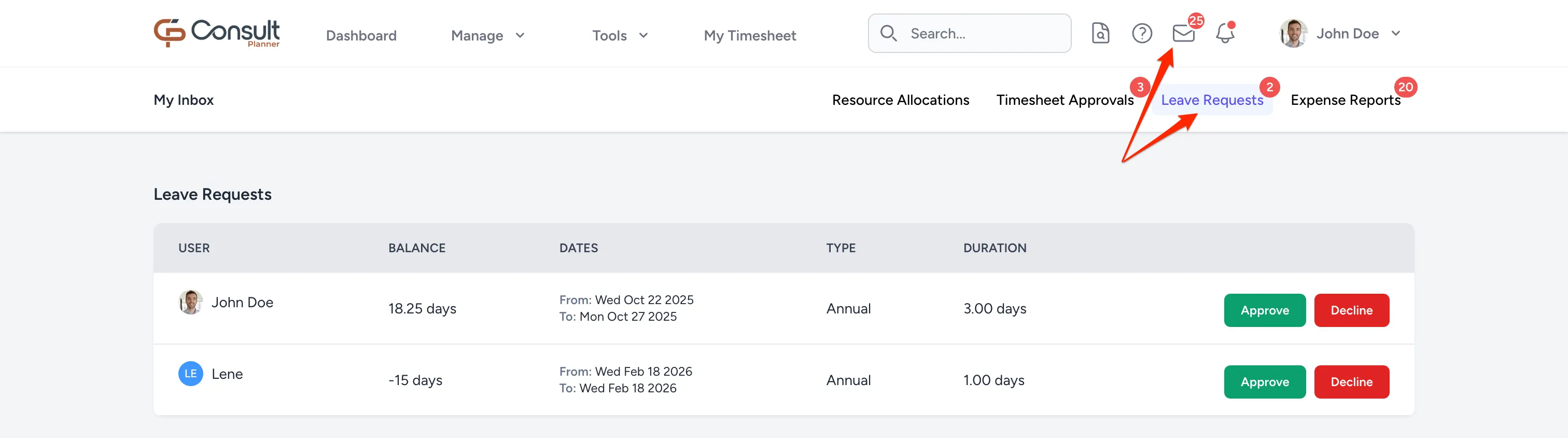
Managers approve or decline employee leave requests directly from the Inbox page. To open it, click the inbox icon in the top navigation:
Leave statuses
A leave request can have one of the following statuses:
- Approved: The request has been reviewed and accepted.
- Declined: The request has been reviewed and rejected.
- Pending: The request is waiting for manager action.
- Cancelled: The request was withdrawn and is no longer active.
After approval
When a leave request is approved, the employee’s leave record is updated automatically. Email notifications are sent to the employee and to the project managers of any projects the employee is planned against during the leave period. Where a project has a primary project manager, only they are notified for that project.
Note: The project manager does not receive notifications if the PM Notifications option is disabled in the project advanced tab.
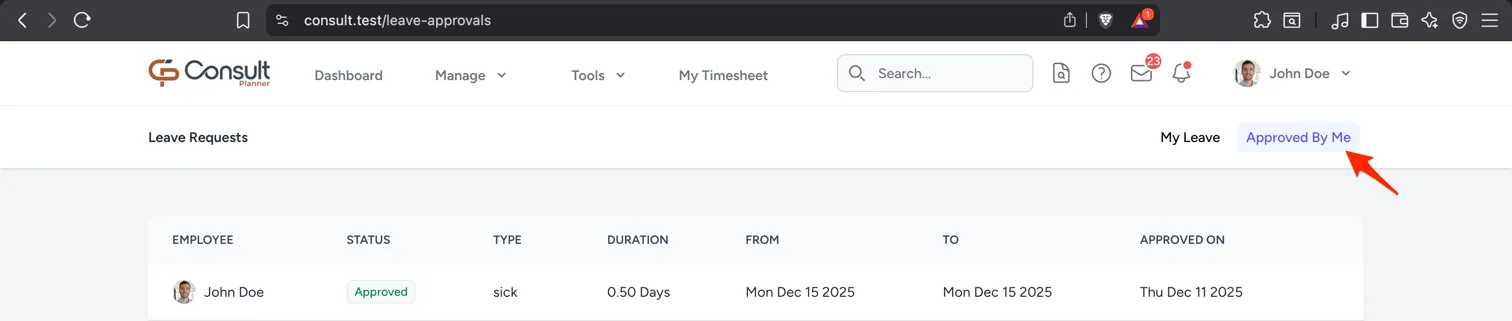
The approved leave appears on the Leave Calendar and Reports pages. All past leave that you have approved appears under the Manage Leave tab:
Declined requests
When a leave request is declined, the employee receives an email notification that the request was rejected. The declined request remains visible to the employee.
Automatic declines
A leave request is declined automatically if it is not approved within 10 days and the start date is more than 3 days in the past.